Exception Handling in Python — NCERT Solutions
Mizoram Board · Class 12 · Computer Science
NCERT Solutions for Exception Handling in Python, Mizoram Board Class 12 Computer Science: 9 textbook questions solved step by step.
Interactive on Super Tutor
Studying Exception Handling in Python? Get the full interactive chapter.
Quizzes, flashcards, AI doubt-solver and a step-by-step study plan — built for NCERT solutions and more.
Free trial, no card needed.
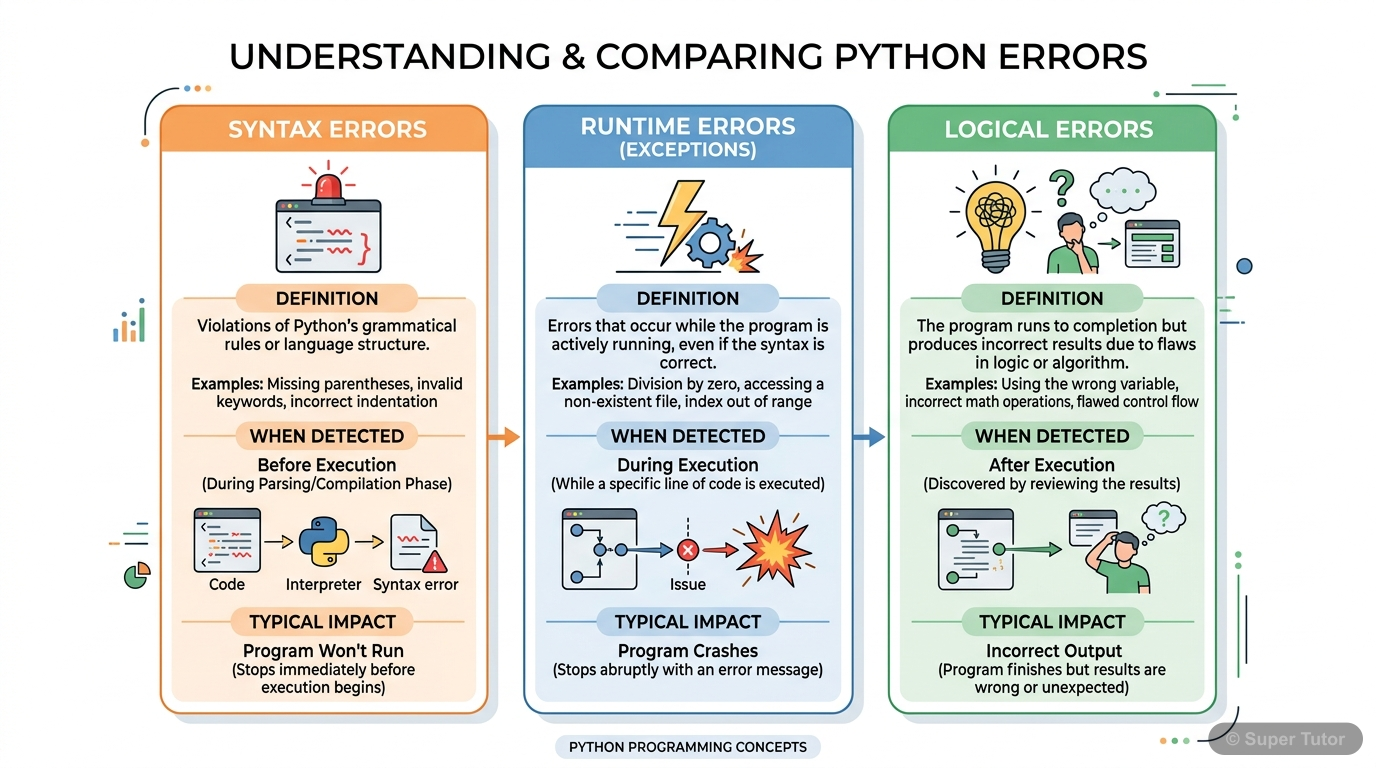
Learn better with visuals Super Tutor pairs illustrations like this with notes and quizzes for Exception Handling in Python.
The first 5 solutions are open to read. The other 4 are free with a Super Tutor account.
EXERCISE — Exception Handling in Python
1"Every syntax error is an exception but every exception cannot be a syntax error." Justify the statement.Show solution
Given concept: Relationship between syntax errors and exceptions in Python.
Justification:
Part 1 — Every syntax error is an exception:
In Python, syntax errors are treated as a special type of exception called SyntaxError. When the Python interpreter encounters code that violates the grammatical rules of the language (e.g., missing colon, incorrect indentation), it raises a SyntaxError exception. Thus, every syntax error is indeed an exception.
Example:
if x = 5:   # SyntaxError: invalid syntax
    print(x)
Here Python raises: SyntaxError: invalid syntax
Part 2 — Every exception cannot be a syntax error:
Exceptions are a much broader category. Many exceptions occur at runtime (during execution) even when the code is syntactically correct. These are called runtime exceptions or logical exceptions and have nothing to do with syntax rules.
Examples:
ZeroDivisionError— occurs when a number is divided by zero (syntax is correct).ValueError— occurs when a function receives an argument of the correct type but inappropriate value.NameError— occurs when a variable is used before being defined.
a = 10
b = 0
print(a / b)   # ZeroDivisionError — syntax is perfectly correct
Conclusion: Since syntax errors form only a subset of all possible exceptions, every syntax error is an exception, but every exception cannot be a syntax error. Hence the statement is justified.
2When are the following built-in exceptions raised? Give examples to support your answers.
a) ImportError
b) IOError
c) NameError
d) ZeroDivisionErrorShow solution
a) ImportError
When raised: ImportError is raised when the import statement fails to find the module being imported, or when a name cannot be imported from a module.
Example:
import mathematics # No such module existsOutput:
ModuleNotFoundError: No module named 'mathematics'(Note: ModuleNotFoundError is a subclass of ImportError.)
Another example:
from math import squareroot # 'squareroot' does not exist in mathOutput:
ImportError: cannot import name 'squareroot' from 'math'b) IOError
When raised: IOError (also known as OSError in Python 3) is raised when an input/output operation fails. Common causes include trying to open a file that does not exist, or lacking permission to read/write a file.
Example:
f = open("nonexistent_file.txt", "r") # File does not existOutput:
FileNotFoundError: [Errno 2] No such file or directory: 'nonexistent_file.txt'(Note: FileNotFoundError is a subclass of IOError/OSError.)
c) NameError
When raised: NameError is raised when a local or global variable (name) is referenced but has not been defined or assigned any value.
Example:
print(total) # 'total' has not been defined anywhereOutput:
NameError: name 'total' is not definedd) ZeroDivisionError
When raised: ZeroDivisionError is raised when the second operand (divisor/denominator) in a division or modulo operation is zero.
Example:
a = 10
b = 0
result = a / b   # Division by zero
print(result)
Output:
ZeroDivisionError: division by zero3What is the use of a raise statement? Write a code to accept two numbers and display the quotient. Appropriate exception should be raised if the user enters the second number (denominator) as zero (0).Show solution
Use of raise statement:
The raise statement is used to explicitly raise (throw) an exception in a program. It allows the programmer to force a specific exception to occur when a certain condition is met, even if Python would not raise it automatically. It is useful for enforcing constraints and validating inputs.
Syntax:
raise ExceptionType("message")Code:
try:
    num1 = int(input("Enter the first number (numerator): "))
    num2 = int(input("Enter the second number (denominator): "))
    if num2 == 0:
        raise ZeroDivisionError("Denominator cannot be zero!")
    quotient = num1 / num2
    print("Quotient =", quotient)
except ZeroDivisionError as e:
    print("Error:", e)
except ValueError:
    print("Please enter valid integer numbers only.")
Sample Output 1 (valid input):
Enter the first number (numerator): 10
Enter the second number (denominator): 2
Quotient = 5.0
Sample Output 2 (denominator = 0):
Enter the first number (numerator): 10
Enter the second number (denominator): 0
Error: Denominator cannot be zero!
Explanation:
- If
num2is 0, theraisestatement explicitly raises aZeroDivisionErrorwith a custom message. - The
exceptblock catches this exception and displays the error message without crashing the program.
4Use assert statement in Question No. 3 to test the division expression in the program.Show solution
Concept: The assert statement is used to test a condition. If the condition is True, execution continues normally. If the condition is False, Python raises an AssertionError with an optional message.
Syntax:
assert condition, "Error message"Code using assert:
try:
    num1 = int(input("Enter the first number (numerator): "))
    num2 = int(input("Enter the second number (denominator): "))
    assert num2 != 0, "Denominator cannot be zero!"
    quotient = num1 / num2
    print("Quotient =", quotient)
except AssertionError as e:
    print("AssertionError:", e)
except ValueError:
    print("Please enter valid integer numbers only.")
Sample Output 1 (valid input):
Enter the first number (numerator): 15
Enter the second number (denominator): 3
Quotient = 5.0
Sample Output 2 (denominator = 0):
Enter the first number (numerator): 15
Enter the second number (denominator): 0
AssertionError: Denominator cannot be zero!
Explanation:
assert num2 != 0checks that the denominator is not zero.- If
num2 == 0, the assertion fails and Python raisesAssertionErrorwith the message "Denominator cannot be zero!". - The
except AssertionErrorblock catches and displays this error gracefully.
5Define the following:
a) Exception Handling
b) Throwing an exception
c) Catching an exceptionShow solution
a) Exception Handling:
Exception handling is the process of writing additional code in a program to deal with runtime errors (exceptions) gracefully, so that the program does not terminate abruptly. It involves:
- Detecting the occurrence of an error.
- Transferring control to a special block of code called the exception handler.
- Displaying meaningful messages to the user and allowing the program to continue or terminate cleanly.
In Python, exception handling is implemented using try, except, else, and finally blocks.
b) Throwing an Exception:
When an error occurs during the execution of a program, the Python interpreter creates an exception object containing information about the error (its type, file name, and position in the program). The process of creating this exception object and handing it over to the runtime system is called throwing (or raising) an exception.
This can happen:
- Automatically — when Python detects a runtime error (e.g., division by zero).
- Explicitly — when the programmer uses the
raiseorassertstatement.
c) Catching an Exception:
An exception is said to be caught when the code specifically designed to handle that particular exception (the exception handler) is executed. In Python, exceptions are caught inside the except block that follows the try block. When the runtime system finds a matching except handler in the call stack, it executes that handler — this process is called catching the exception.
Example:
try:
    x = 10 / 0          # Exception is thrown here
except ZeroDivisionError:  # Exception is caught here
print("Cannot divide by zero")Free with a Super Tutor account
```python
print ("Learning Exceptions...")
try:
num1 = int(input("Enter the first number"))
num2 = int(input("Enter the second number"))
quotient = (num1 / num2)
print("Both the numbers entered were correct")
except __________ : # to enter only integers
print("Please enter only numbers")
except __________ : # Denominator should not be zero
print("Number 2 should not be zero")
else:
print("Great .. you are a good programmer")
__________ : # to be executed at the end
print("JOB OVER... GO GET SOME REST")
```
Free with a Super Tutor account
Free with a Super Tutor account
Free with a Super Tutor account
4 more solved questions in Exception Handling in Python
They are free with a Super Tutor account, along with practice quizzes and flashcards for this chapter. Free to start, no card needed.
Frequently Asked Questions
What are the important topics in Exception Handling in Python for Mizoram Board Class 12 Computer Science?
Are these NCERT Solutions for Exception Handling in Python free?
How should I revise Exception Handling in Python for the Mizoram Board Class 12 board exam?
Sources & Official References
Content is aligned to the official syllabus. Refer to the board website for the latest curriculum.
More resources for Exception Handling in Python
Practice Quiz
Test yourself with a quick quiz
Important Questions
Exam-style questions with answers
Revision Notes
Key points for last-minute revision
Formula Sheet
The chapter's formulas in one place
Chapter Summary
Understand the chapter at a glance
Concept Maps
See how topics connect
Study Plan
Step-by-step plan for this chapter
Flashcards
Quick-fire cards for active recall
Syllabus
What topics to cover
For serious students
Get the full Exception Handling in Python chapter — start free.
Quizzes, flashcards, an AI doubt solver and a study plan for Mizoram Board Class 12 Computer Science. Free to start, no card needed.