Computer Hardware Components — Practice Quiz
ICSE · Class 7 · Computer Studies
4 MCQs on Computer Hardware Components for ICSE Class 7 Computer Studies: tap an answer to check it and see why. The full chapter test has 43 questions.
Interactive on Super Tutor
Studying Computer Hardware Components? Get the full interactive chapter.
Quizzes, flashcards, AI doubt-solver and a step-by-step study plan — built for practice quiz and more.
Free trial, no card needed.
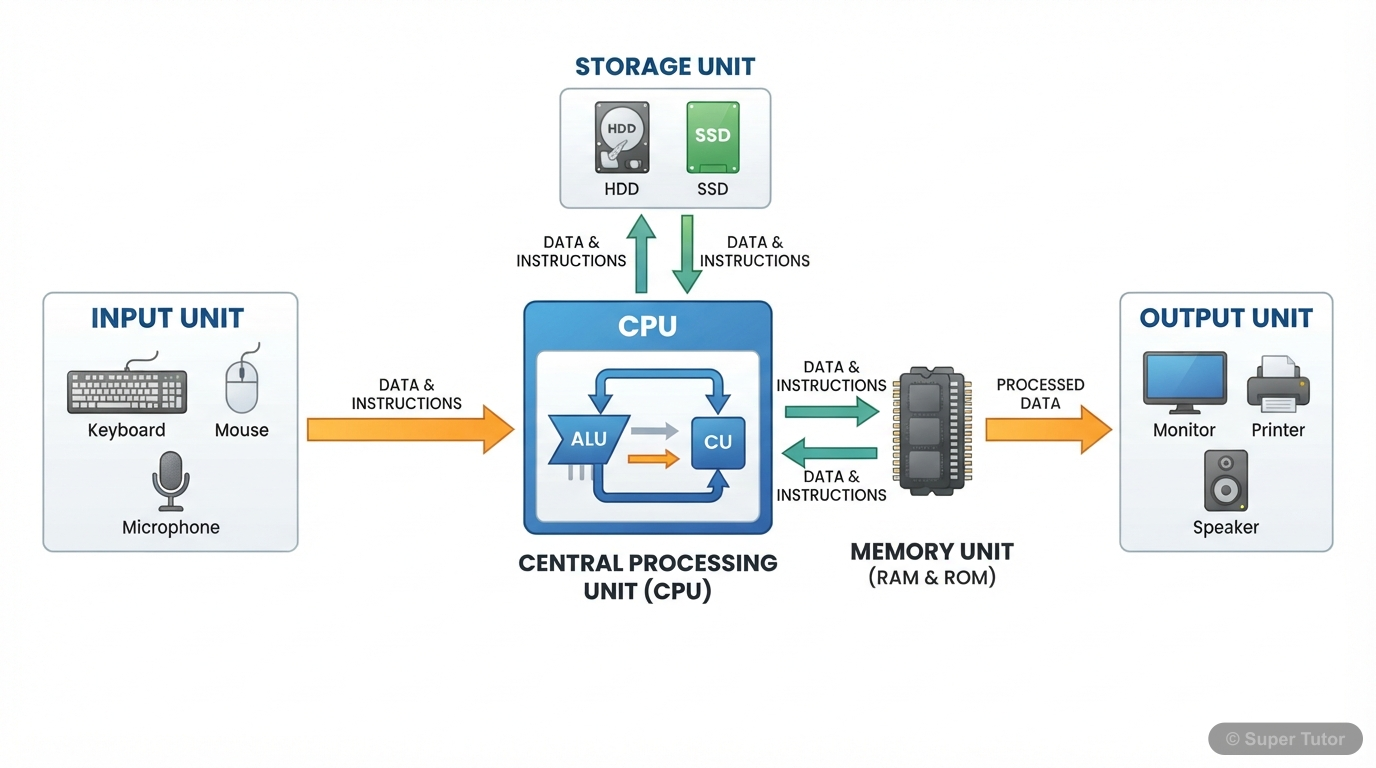
Learn better with visuals Super Tutor pairs illustrations like this with notes and quizzes for Computer Hardware Components.
Get startedQuick Quiz: Computer Hardware Components
0/4Tap an answer to check it instantly. No sign-up needed for these 4.
Which part of the CPU performs all arithmetic operations like addition, subtraction, multiplication, and division?
RAM is called 'volatile memory' because:
Which component of a computer is called the 'Brain of the Computer'?
Which of the following is a correct conversion of memory units?
Sample Questions
What is the main function of the Control Unit in a CPU?
Show answer
To control all parts of the computer and send commands to them
Step 1: The CPU has three parts — ALU, Control Unit, and Memory Unit, each with a different role. Step 2: The Control Unit acts like a manager or supervisor. Step 3: It retrieves data and instructions from memory and directs other parts of the computer on what to do. Step 4: It sends commands to all parts including peripherals like printers and keyboards. Step 5: Mathematical calculations are done by the ALU, not the Control Unit. Permanent storage is done by secondary memory, not the Control Unit.
Which of the following is an example of system software?
Show answer
Windows Operating System
Step 1: Software is of two types — System Software and Application Software. Step 2: System Software controls the operations of the computer system and provides a platform for other software to run. Step 3: The Operating System (like Windows, Linux, or Android) is the best example of system software. Step 4: Application software is designed for specific tasks — MS Word is for writing documents, MS Excel is for spreadsheets, and Adobe Photoshop is for editing images. Step 5: These applications run on top of the system software, so the Operating System is the correct answer here.
A modem is used in a computer system primarily to:
Show answer
Convert digital signals to analog signals and vice versa
Step 1: Computers understand only digital signals (represented by 0s and 1s). Step 2: However, communication lines (like telephone lines) often carry analog signals, which are continuous wave-like signals. Step 3: A modem (Modulator-Demodulator) solves this problem. Step 4: It modulates outgoing digital signals from the computer into analog signals for transmission. Step 5: It also demodulates incoming analog signals back into digital signals that the computer can understand. So a modem acts as a translator between digital and analog signals.
Which port transmits data bit by bit (one bit at a time) and is used to connect devices like a mouse or modem?
Show answer
Serial Port
Step 1: Communication ports connect peripheral devices to the CPU. Step 2: A Serial Port transmits data serially — that means one bit at a time over a single wire. Step 3: If a byte (8 bits) is to be sent, a serial port takes 8 separate turns to send it, making it slower. Step 4: Serial ports are available with 9 or 24 pins and connect devices like mouse and modem. Step 5: A Parallel Port sends 8 bits at once (much faster), and a USB Port uses a single plug arrangement without pin configuration. So Serial Port is the correct answer.
+39 more questions on Computer Hardware Components (ICSE Class 7 Computer Studies)
Practise AllFrequently Asked Questions
What are the important topics in Computer Hardware Components for ICSE Class 7 Computer Studies?
How many practice questions are there for Computer Hardware Components?
Sources & Official References
Content is aligned to the official syllabus. Refer to the board website for the latest curriculum.
More resources for Computer Hardware Components
Important Questions
Exam-style questions with answers
Revision Notes
Key points for last-minute revision
Chapter Summary
Understand the chapter at a glance
Concept Maps
See how topics connect
Study Plan
Step-by-step plan for this chapter
Flashcards
Quick-fire cards for active recall
Syllabus
What topics to cover
For serious students
Get the full Computer Hardware Components chapter — start free.
Quizzes, flashcards, an AI doubt solver and a study plan for ICSE Class 7 Computer Studies. Free to start, no card needed.