Security Aspects — NCERT Solutions
Jammu & Kashmir Board · Class 12 · Computer Science
NCERT Solutions for Security Aspects, Jammu & Kashmir Board Class 12 Computer Science: 17 textbook questions solved step by step.
Interactive on Super Tutor
Studying Security Aspects? Get the full interactive chapter.
Quizzes, flashcards, AI doubt-solver and a step-by-step study plan — built for NCERT solutions and more.
Free trial, no card needed.
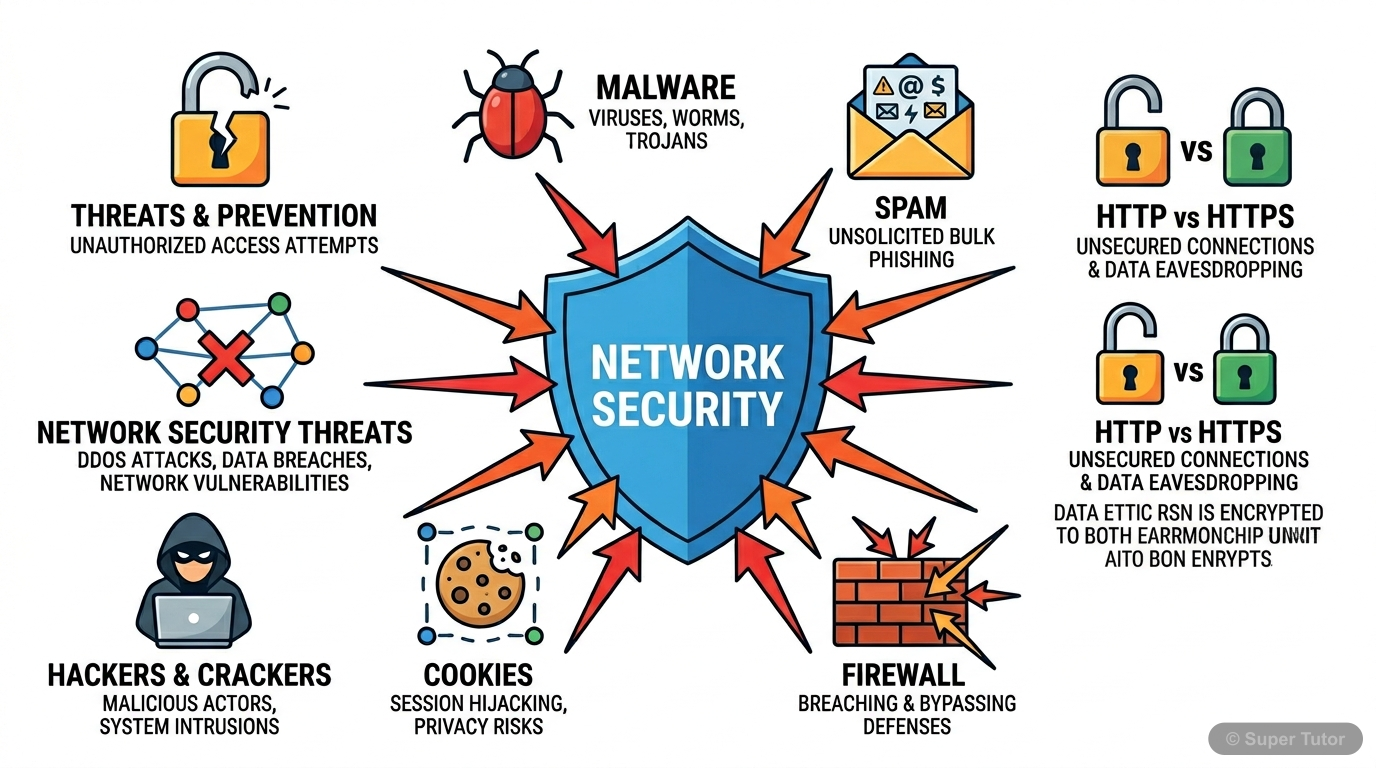
Learn better with visuals Super Tutor pairs illustrations like this with notes and quizzes for Security Aspects.
The first 9 solutions are open to read. The other 8 are free with a Super Tutor account.
EXERCISE — Chapter 12: Security Aspects (Computer Science, Class XII)
1Why is a computer considered to be safe if it is not connected to a network or Internet?Show solution
Given/Concept: Most malware spreads through network connections, the Internet, or shared online resources.
Explanation:
A computer that is not connected to any network or the Internet is considered relatively safe because:
- No Remote Access: Hackers and crackers cannot remotely access or exploit the system since there is no network pathway available to them.
- No Malware Download: Malware such as viruses, worms, Trojans, ransomware, spyware, and adware are commonly downloaded from the Internet or spread through network connections. Without Internet access, this route is completely blocked.
- No Spam/Phishing: Email-based threats like spam, phishing links, and malicious attachments cannot reach the computer.
- No Network Intrusion: Attacks such as DoS, DDoS, snooping, eavesdropping, and buffer overflow attacks that rely on network traffic cannot be executed.
- No Drive-by Downloads: Visiting malicious websites or clicking unsafe links is not possible without Internet connectivity.
Note: A completely isolated (air-gapped) computer can still be infected through infected removable storage devices (e.g., USB drives), but the risk is significantly reduced compared to a networked computer.
Conclusion: Since the majority of malware distribution channels require a network or Internet connection, an offline computer is considered much safer.
2What is a computer virus? Name some computer viruses that were popular in recent years.Show solution
Definition of Computer Virus:
A computer virus is a piece of malicious software (malware) code that is created to perform harmful activities and hamper the resources of a computer system. Like a biological virus, a computer virus attaches itself to a legitimate program or file and replicates itself when that program is executed. It can corrupt or delete data, slow down the system, and spread to other computers.
Key Characteristics:
- It requires a host program to attach itself to.
- It replicates and spreads to other files/systems.
- It is activated when the infected program is run.
- It can cause damage to hardware, software, or data.
Some Popular Computer Viruses in Recent Years:
| Virus/Malware | Description |
|---|---|
| ILOVEYOU (Love Bug) | Spread via email, overwrote files and sent itself to all contacts. |
| WannaCry | A ransomware virus that encrypted user data and demanded Bitcoin ransom (2017). |
| Melissa | A macro virus that spread via email and caused massive email server overloads. |
| Stuxnet | A sophisticated virus targeting industrial control systems. |
| CryptoLocker | A ransomware that encrypted files and demanded payment for decryption. |
| Mydoom | One of the fastest-spreading email worms/viruses. |
Conclusion: A computer virus is a self-replicating malicious code that attaches to host programs and causes damage to the infected system.
3How is a computer worm different from a virus?Show solution
Concept: Both virus and worm are types of malware, but they differ in how they operate and spread.
Differences between a Computer Worm and a Virus:
| Basis of Difference | Computer Virus | Computer Worm |
|---|---|---|
| Host Dependency | Requires a host program or file to attach itself to. | Is a standalone program; does not need a host file. |
| Replication | Replicates only when the infected host program is executed. | Can replicate and spread on its own without any user action. |
| Spreading | Spreads when an infected file is shared or executed. | Spreads automatically through networks, emails, or the Internet. |
| Activation | Needs human intervention (running the infected file) to activate. | Does not need human intervention; self-activating. |
| Damage | Typically corrupts or modifies files. | Primarily consumes network bandwidth and system resources, causing slowdowns. |
| Example | ILOVEYOU, Melissa | Morris Worm, Blaster |
Summary:
- A virus attaches to a host and needs the host to be executed to spread.
- A worm is independent, self-replicating, and can spread across networks automatically without any host program.
Conclusion: The key difference is that a worm is a standalone program capable of self-propagation, whereas a virus depends on a host program to replicate and spread.
4How is Ransomware used to extract money from users?Show solution
Given/Concept: Ransomware is a type of malware that targets user data.
How Ransomware Works to Extract Money:
Step 1 – Infection:
Ransomware enters the victim's computer through spam emails, malicious downloads, infected websites, or network vulnerabilities.
Step 2 – Encryption / Blocking:
Once installed, the ransomware either:
- Encrypts the user's personal files and data (documents, photos, videos, etc.) making them completely inaccessible to the user, OR
- Locks the user out of their own system entirely.
Step 3 – Ransom Demand:
After blocking access, the ransomware displays a message on the screen demanding a ransom payment (usually in cryptocurrency like Bitcoin to remain untraceable) in exchange for:
- The decryption key to unlock the encrypted files, OR
- Restoring access to the system.
Step 4 – Threat:
Some ransomware also threatens to publish the victim's sensitive or personal data online if the ransom is not paid within a given time limit, adding further pressure on the victim.
Step 5 – Payment:
If the victim pays the ransom, the attacker may (or may not) provide the decryption key. There is no guarantee that paying the ransom will restore the data.
Example: WannaCry (2017) encrypted files on thousands of computers worldwide and demanded Bitcoin payments.
Conclusion: Ransomware exploits the user's dependency on their own data by encrypting or blocking it and demanding payment for restoration, making it a highly effective cybercrime tool.
5How did a Trojan get its name?Show solution
Concept: The name 'Trojan' is derived from ancient Greek mythology.
Origin of the Name:
The term Trojan (or Trojan Horse) comes from the ancient Greek story of the Trojan War. According to the legend, the Greeks built a giant wooden horse and hid their soldiers inside it. They presented this horse as a gift to the city of Troy. The Trojans, believing it to be a genuine gift, brought the horse inside their city walls. At night, the Greek soldiers hidden inside the horse came out and attacked the city of Troy from within, leading to its fall.
Connection to Malware:
Similarly, a Trojan malware disguises itself as a legitimate, useful, or harmless software (just like the wooden horse appeared to be a gift). When a user is tricked into installing it, the Trojan secretly performs malicious activities in the background — such as stealing data, creating backdoors, or acting like a virus or worm — without the user's knowledge.
Key Characteristics of a Trojan:
- It does not self-replicate (unlike a virus or worm).
- It relies on social engineering to trick users into installing it.
- Once installed, it can cause significant damage or allow unauthorised access.
Conclusion: The Trojan malware gets its name from the mythological Trojan Horse because, just like the horse, it appears legitimate on the outside but carries a hidden malicious payload inside.
6How does an adware generate revenue for its creator?Show solution
Given/Concept: Adware is a type of malware that displays unwanted online advertisements.
How Adware Generates Revenue:
Adware generates revenue for its creator through the following mechanisms:
- Pay-Per-Click (PPC) Advertising:
Adware displays pop-up advertisements, banners, or sponsored links on the user's screen. Every time a user (intentionally or accidentally) clicks on one of these advertisements, the adware creator earns a small amount of money from the advertiser. This is the most common revenue model.
- Pay-Per-View / Pay-Per-Impression:
Some advertisers pay the adware creator simply for displaying their advertisement to users, regardless of whether the user clicks on it or not. The more users infected, the more impressions generated, and the more revenue earned.
- Redirecting to Paid Websites:
Adware may redirect users to specific websites or online stores. If the user makes a purchase on that website, the adware creator earns an affiliate commission.
- Collecting and Selling User Data:
Adware may also collect browsing habits, preferences, and personal data of users and sell this data to third-party advertisers or marketing companies.
- Promoting Malware or Paid Software:
Adware may display links to paid software or other malware, tricking users into downloading them, thereby generating revenue.
Note: Although adware is usually considered annoying but harmless, it often paves the way for other malware by displaying unsafe links as advertisements.
Conclusion: Adware primarily generates revenue through pay-per-click and pay-per-impression advertising models, by displaying unwanted advertisements to a large number of infected users.
7Briefly explain two threats that may arise due to a keylogger installed on a computer.Show solution
Given/Concept: A keylogger records all keys pressed by a user on the keyboard and may send this information to an external entity.
Two Major Threats due to a Keylogger:
Threat 1 – Password and Credential Theft:
A keylogger records every keystroke made by the user, including usernames and passwords typed during login to email accounts, banking websites, social media, or any other online service. This recorded information is then sent to the attacker, who can use these credentials to gain unauthorised access to the victim's accounts. This can lead to financial loss (in case of banking credentials) or identity theft.
Example: If a user types their net banking password on an infected computer, the keylogger captures it and sends it to the hacker, who can then log in and transfer funds.
Threat 2 – Leakage of Private and Sensitive Information:
A keylogger records all keyboard activity, including private emails, personal messages, confidential business communications, credit card numbers, and other sensitive data typed by the user. This information is sent to an external entity without the user's knowledge or consent, leading to a serious breach of privacy. The attacker can misuse this information for blackmail, corporate espionage, or identity fraud.
Example: Private conversations typed in a chat application or confidential business strategies typed in a document can be captured and misused.
Preventive Measure: One strategy to avoid password leaks by keyloggers is to use an online virtual keyboard (which randomises the key layout) while signing into accounts on an unknown computer.
Conclusion: Keyloggers pose serious threats of credential theft and privacy breaches by silently recording and transmitting all keyboard activity.
8How is a Virtual Keyboard safer than On Screen Keyboard?Show solution
Given/Concept: Both on-screen keyboard and online virtual keyboard are software-based keyboards, but they differ in their key layout.
On-Screen Keyboard:
- An on-screen keyboard is an application software (part of the operating system) that uses a fixed QWERTY key layout every time it is used.
- Since the layout is always the same and predictable, a sophisticated keylogger software can easily map the screen coordinates of each key to the corresponding character.
- Therefore, even though the user is clicking on a screen instead of pressing physical keys, a keylogger can still determine which key was pressed by monitoring mouse clicks and the fixed key positions.
Online Virtual Keyboard:
- An online virtual keyboard is a web-based or standalone software that randomises the key layout every time it is used.
- Since the position of each key changes randomly with every use, a keylogger software cannot predict or map which key corresponds to which character based on screen coordinates.
- This makes it very difficult for a keylogger to record the actual keys pressed by the user.
Why Virtual Keyboard is Safer:
| Feature | On-Screen Keyboard | Online Virtual Keyboard |
|---|---|---|
| Key Layout | Fixed QWERTY (always same) | Randomised every time |
| Vulnerability to Keylogger | High (layout is predictable) | Very Low (layout changes each time) |
| Safety for Password Entry | Less safe | Much safer |
Conclusion: An online virtual keyboard is safer than an on-screen keyboard because its randomised key layout prevents keylogger software from mapping screen positions to characters, thereby protecting sensitive information like passwords.
9List and briefly explain different modes of malware distribution.Show solution
Given/Concept: Malware can reach a computer through various routes or modes of distribution.
Different Modes of Malware Distribution:
1. Downloaded from the Internet:
Malware is often bundled with free software, games, movies, music, or other files available for download on the Internet. When a user downloads and installs such files, the malware gets installed along with them. Visiting malicious or compromised websites can also trigger automatic (drive-by) downloads of malware.
2. Spam Email:
Malware is frequently distributed through spam emails. These emails may contain:
- Malicious attachments (e.g., infected Word documents, PDFs, or executable files) that install malware when opened.
- Phishing links that redirect users to fake websites designed to steal credentials or download malware.
3. Using Infected Removable Storage Devices:
Malware can spread through infected USB drives, external hard disks, memory cards, or CDs/DVDs. When an infected removable device is connected to a clean computer, the malware automatically copies itself onto the new system (especially through the AutoRun feature).
4. Network Propagation:
Worms and other malware can spread automatically across computer networks by exploiting vulnerabilities in network protocols, operating systems, or applications. Once one computer in a network is infected, the malware can scan and infect other connected computers without any user interaction.
5. Social Engineering:
Attackers trick users into installing malware by disguising it as legitimate software (Trojans), fake system updates, or security alerts.
Conclusion: Malware can reach a computer through the Internet, spam emails, infected removable devices, network propagation, and social engineering, making it important to be cautious across all these channels.
Free with a Super Tutor account
Free with a Super Tutor account
Free with a Super Tutor account
Free with a Super Tutor account
Free with a Super Tutor account
Free with a Super Tutor account
Free with a Super Tutor account
Free with a Super Tutor account
8 more solved questions in Security Aspects
They are free with a Super Tutor account, along with practice quizzes and flashcards for this chapter. Free to start, no card needed.
Frequently Asked Questions
What are the important topics in Security Aspects for Jammu & Kashmir Board Class 12 Computer Science?
Are these NCERT Solutions for Security Aspects free?
How should I revise Security Aspects for the Jammu & Kashmir Board Class 12 board exam?
Sources & Official References
Content is aligned to the official syllabus. Refer to the board website for the latest curriculum.
More resources for Security Aspects
Practice Quiz
Test yourself with a quick quiz
Important Questions
Exam-style questions with answers
Revision Notes
Key points for last-minute revision
Chapter Summary
Understand the chapter at a glance
Concept Maps
See how topics connect
Study Plan
Step-by-step plan for this chapter
Flashcards
Quick-fire cards for active recall
Syllabus
What topics to cover
For serious students
Get the full Security Aspects chapter — start free.
Quizzes, flashcards, an AI doubt solver and a study plan for Jammu & Kashmir Board Class 12 Computer Science. Free to start, no card needed.