Computer Networks — NCERT Solutions
Meghalaya Board · Class 12 · Computer Science
NCERT Solutions for Computer Networks, Meghalaya Board Class 12 Computer Science: 16 textbook questions solved step by step.
Interactive on Super Tutor
Studying Computer Networks? Get the full interactive chapter.
Quizzes, flashcards, AI doubt-solver and a step-by-step study plan — built for NCERT solutions and more.
Free trial, no card needed.
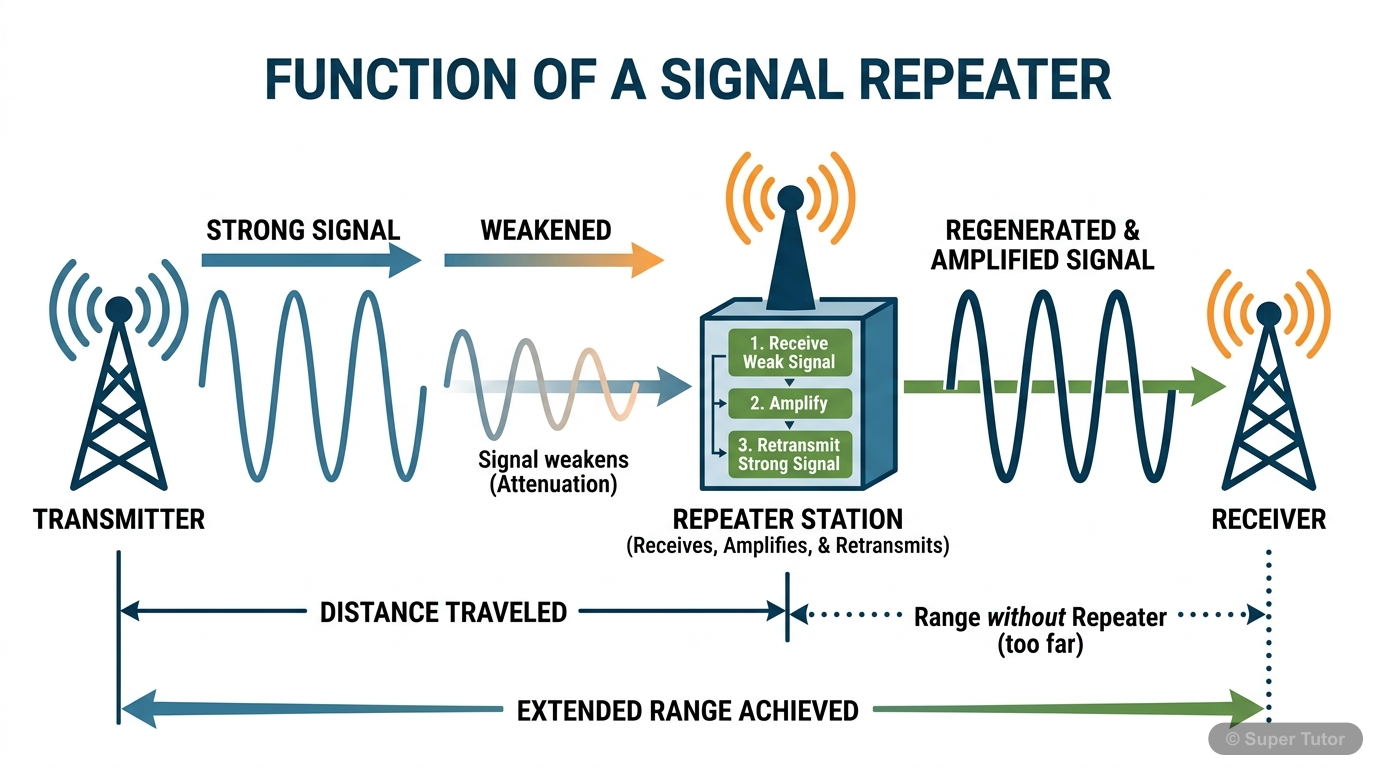
Learn better with visuals Super Tutor pairs illustrations like this with notes and quizzes for Computer Networks.
The first 8 solutions are open to read. The other 8 are free with a Super Tutor account.
EXERCISE — Computer Networks (Chapter 10)
1Expand the following:
a) ARPANET
b) MAC
c) ISP
d) URIShow solution
Given: Abbreviations to be expanded.
Answers:
a) ARPANET — Advanced Research Projects Agency NETwork
b) MAC — Media Access Control
c) ISP — Internet Service Provider
d) URI — Uniform Resource Identifier
2What do you understand by the term network?Show solution
Definition:
A computer network is an interconnection among two or more computers or computing devices that are linked together to share data, resources (such as printers, files, internet connection), and to communicate with each other.
Key points:
- Each device that is part of a network and can receive, create, store or send data is called a node.
- Networks can be wired (using cables) or wireless (using radio waves).
Example: The computers in a school laboratory connected together so that they can share files and a common printer form a network.
3Mention any two main advantages of using a network of computing devices.Show solution
Two main advantages of a computer network:
- Resource Sharing: Hardware resources (such as printers, scanners) and software resources (such as applications, files) can be shared among all the computers connected in the network. This reduces cost and avoids duplication.
- Data Communication / File Sharing: Users on a network can easily share data and communicate with each other (via e-mail, messaging, etc.) regardless of their physical location, making collaboration faster and more efficient.
(Additional advantage for reference: Centralised data storage and management, which makes backup and security easier.)
4Differentiate between LAN and WAN.Show solution
Given: Two types of networks — LAN and WAN.
| Feature | LAN (Local Area Network) | WAN (Wide Area Network) |
|---|---|---|
| Full Form | Local Area Network | Wide Area Network |
| Geographical Area | Limited area — a single room, floor, office building, or campus | Very large area — a country, continent, or the entire globe |
| Data Transfer Rate | High (typically 100 Mbps to 10 Gbps) | Comparatively lower |
| Ownership | Usually privately owned and managed | May be owned by multiple organisations or service providers |
| Cost | Less expensive to set up | More expensive to set up and maintain |
| Example | Computers connected in a school lab | The Internet; a bank's network connecting branches across India |
Conclusion: LAN covers a small, localised area with high speed, while WAN covers a vast geographical area connecting multiple LANs and MANs.
5Write down the names of few commonly used networking devices.Show solution
Commonly used networking devices:
- Modem — Converts digital signals to analog and vice versa for transmission over telephone lines.
- NIC (Network Interface Card) — Connects a computer to the network.
- Repeater — Regenerates weak signals to extend the range of a network.
- Hub — Connects multiple devices; broadcasts data to all connected devices.
- Switch — Connects multiple devices; sends data only to the intended destination device.
- Router — Connects different networks and routes data packets between them.
- Gateway — Acts as the entry/exit point between two different networks.
6Two universities in different States want to transfer information. Which type of network they need to use for this?Show solution
Given: Two universities located in different States need to transfer information.
Answer: They need to use a WAN (Wide Area Network).
Reason:
- LAN covers only a limited area (a single building or campus).
- MAN covers a city or town.
- Since the two universities are in different States, the geographical distance is very large. WAN is designed to connect computers and networks spread across different geographical locations of a country or even different countries.
- The Internet is the most common example of a WAN that can be used for this purpose.
Conclusion: The two universities should use a Wide Area Network (WAN) or the Internet to transfer information between them.
7Define the term topology. What are the popular network topologies?Show solution
Definition of Topology:
The arrangement (layout) of computers and other peripheral devices in a network — i.e., how the nodes are connected to each other — is called network topology.
Topology defines both the physical layout (actual wiring) and the logical layout (how data flows) of a network.
Popular Network Topologies:
- Mesh Topology — Every device is connected to every other device.
- Ring Topology — Each node is connected to exactly two other nodes, forming a ring.
- Bus Topology — All nodes are connected to a single common cable called the bus.
- Star Topology — All nodes are connected to a central device (hub or switch).
- Tree (Hybrid) Topology — A combination of two or more topologies; has multiple branches, each of which can have star, ring, or bus topology.
8How is tree topology different from bus topology?Show solution
Difference between Tree Topology and Bus Topology:
| Feature | Bus Topology | Tree Topology |
|---|---|---|
| Structure | All nodes are connected to a single backbone cable (bus). | Multiple branches extend from a root node; each branch can have its own topology (star, bus, ring). |
| Hierarchy | No hierarchical structure; all nodes are at the same level. | Has a hierarchical (parent-child) structure. |
| Scalability | Difficult to expand; adding more nodes degrades performance. | Easier to expand by adding new branches. |
| Fault Tolerance | If the main bus fails, the entire network goes down. | If one branch fails, other branches continue to work. |
| Complexity | Simple and inexpensive. | More complex and expensive than bus topology. |
| Example | Small office networks. | Large organisations with departments. |
Conclusion: Tree topology is a more scalable and fault-tolerant extension of bus topology, organised in a hierarchical manner.
a) Each node is connected with the help of a single cable.
b) Each node is connected with central switching through independent cables.
Free with a Super Tutor account
Free with a Super Tutor account
a) Switch
b) Repeater
c) Router
d) Gateway
e) NIC
Free with a Super Tutor account
Free with a Super Tutor account
Free with a Super Tutor account
Free with a Super Tutor account
Free with a Super Tutor account
Free with a Super Tutor account
8 more solved questions in Computer Networks
They are free with a Super Tutor account, along with practice quizzes and flashcards for this chapter. Free to start, no card needed.
Frequently Asked Questions
What are the important topics in Computer Networks for Meghalaya Board Class 12 Computer Science?
Are these NCERT Solutions for Computer Networks free?
How should I revise Computer Networks for the Meghalaya Board Class 12 board exam?
Sources & Official References
Content is aligned to the official syllabus. Refer to the board website for the latest curriculum.
More resources for Computer Networks
Practice Quiz
Test yourself with a quick quiz
Important Questions
Exam-style questions with answers
Revision Notes
Key points for last-minute revision
Chapter Summary
Understand the chapter at a glance
Concept Maps
See how topics connect
Study Plan
Step-by-step plan for this chapter
Flashcards
Quick-fire cards for active recall
Syllabus
What topics to cover
For serious students
Get the full Computer Networks chapter — start free.
Quizzes, flashcards, an AI doubt solver and a study plan for Meghalaya Board Class 12 Computer Science. Free to start, no card needed.