Computer Networks
Tripura Board · Class 12 · Computer Science
NCERT Solutions for Computer Networks — Tripura Board Class 12 Computer Science.
Interactive on Super Tutor
Studying Computer Networks? Get the full interactive chapter.
Quizzes, flashcards, AI doubt-solver and a step-by-step study plan — built for ncert solutions and more.
1,000+ Class 12 students started this chapter today

This is just one of 23+ visuals inside Super Tutor's Computer Networks chapter
Explore the full setEXERCISE — Computer Networks (Chapter 10)
1Expand the following:
a) ARPANET
b) MAC
c) ISP
d) URIShow solution
Answers:
a) ARPANET — Advanced Research Projects Agency NETwork
b) MAC — Media Access Control
c) ISP — Internet Service Provider
d) URI — Uniform Resource Identifier
2What do you understand by the term network?Show solution
A computer network is an interconnection among two or more computers or computing devices that are linked together to share data, resources (such as printers, files, internet connection), and to communicate with each other.
Key points:
- Each device that is part of a network and can receive, create, store or send data is called a node.
- Networks can be wired (using cables) or wireless (using radio waves).
Example: The computers in a school laboratory connected together so that they can share files and a common printer form a network.
3Mention any two main advantages of using a network of computing devices.Show solution
1. Resource Sharing: Hardware resources (such as printers, scanners) and software resources (such as applications, files) can be shared among all the computers connected in the network. This reduces cost and avoids duplication.
2. Data Communication / File Sharing: Users on a network can easily share data and communicate with each other (via e-mail, messaging, etc.) regardless of their physical location, making collaboration faster and more efficient.
*(Additional advantage for reference: Centralised data storage and management, which makes backup and security easier.)*
4Differentiate between LAN and WAN.Show solution
| Feature | LAN (Local Area Network) | WAN (Wide Area Network) |
|---|---|---|
| Full Form | Local Area Network | Wide Area Network |
| Geographical Area | Limited area — a single room, floor, office building, or campus | Very large area — a country, continent, or the entire globe |
| Data Transfer Rate | High (typically 100 Mbps to 10 Gbps) | Comparatively lower |
| Ownership | Usually privately owned and managed | May be owned by multiple organisations or service providers |
| Cost | Less expensive to set up | More expensive to set up and maintain |
| Example | Computers connected in a school lab | The Internet; a bank's network connecting branches across India |
Conclusion: LAN covers a small, localised area with high speed, while WAN covers a vast geographical area connecting multiple LANs and MANs.
5Write down the names of few commonly used networking devices.Show solution
1. Modem — Converts digital signals to analog and vice versa for transmission over telephone lines.
2. NIC (Network Interface Card) — Connects a computer to the network.
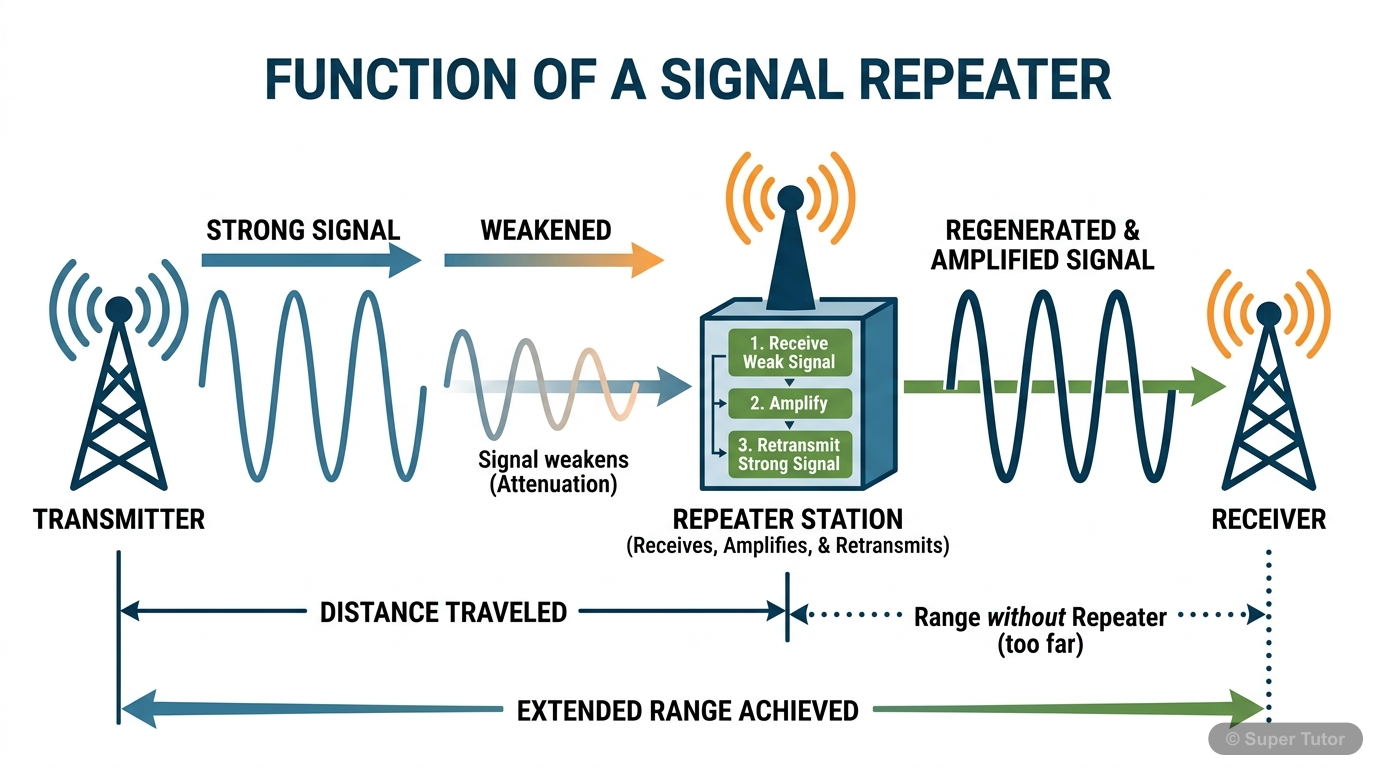
3. Repeater — Regenerates weak signals to extend the range of a network.
4. Hub — Connects multiple devices; broadcasts data to all connected devices.
5. Switch — Connects multiple devices; sends data only to the intended destination device.
6. Router — Connects different networks and routes data packets between them.
7. Gateway — Acts as the entry/exit point between two different networks.
6Two universities in different States want to transfer information. Which type of network they need to use for this?Show solution
Answer: They need to use a WAN (Wide Area Network).
Reason:
- LAN covers only a limited area (a single building or campus).
- MAN covers a city or town.
- Since the two universities are in different States, the geographical distance is very large. WAN is designed to connect computers and networks spread across different geographical locations of a country or even different countries.
- The Internet is the most common example of a WAN that can be used for this purpose.
Conclusion: The two universities should use a Wide Area Network (WAN) or the Internet to transfer information between them.
7Define the term topology. What are the popular network topologies?Show solution
The arrangement (layout) of computers and other peripheral devices in a network — i.e., how the nodes are connected to each other — is called network topology.
Topology defines both the physical layout (actual wiring) and the logical layout (how data flows) of a network.
Popular Network Topologies:
1. Mesh Topology — Every device is connected to every other device.
2. Ring Topology — Each node is connected to exactly two other nodes, forming a ring.
3. Bus Topology — All nodes are connected to a single common cable called the bus.
4. Star Topology — All nodes are connected to a central device (hub or switch).
5. Tree (Hybrid) Topology — A combination of two or more topologies; has multiple branches, each of which can have star, ring, or bus topology.
8How is tree topology different from bus topology?Show solution
| Feature | Bus Topology | Tree Topology |
|---|---|---|
| Structure | All nodes are connected to a single backbone cable (bus). | Multiple branches extend from a root node; each branch can have its own topology (star, bus, ring). |
| Hierarchy | No hierarchical structure; all nodes are at the same level. | Has a hierarchical (parent-child) structure. |
| Scalability | Difficult to expand; adding more nodes degrades performance. | Easier to expand by adding new branches. |
| Fault Tolerance | If the main bus fails, the entire network goes down. | If one branch fails, other branches continue to work. |
| Complexity | Simple and inexpensive. | More complex and expensive than bus topology. |
| Example | Small office networks. | Large organisations with departments. |
Conclusion: Tree topology is a more scalable and fault-tolerant extension of bus topology, organised in a hierarchical manner.
9Identify the type of topology from the following:
a) Each node is connected with the help of a single cable.
b) Each node is connected with central switching through independent cables.Show solution
→ This is Bus Topology.
Reason: In bus topology, all nodes share a single common backbone cable (called the bus). Data sent by any node travels along this single cable and can be received by all other nodes.
---
b) Each node is connected with central switching through independent cables.
→ This is Star Topology.
Reason: In star topology, each communicating device (node) is connected to a central networking device (hub or switch) through its own independent cable. All communication between nodes passes through this central device.
10What do you mean by a modem? Why is it used?Show solution
Modem stands for MOdulator DEModulator. It is a hardware device used for conversion between the digital data (used by computers) and analog signals (used for transmission over telephone lines or cable lines).
Working:
- Modulation: The modem converts digital data (0s and 1s) from the computer into analog signals for transmission over the telephone line.
- Demodulation: At the receiving end, the modem converts the incoming analog signals back into digital data that the computer can understand.
Why is it used?
A modem is used to:
1. Connect a computer or a local network to the Internet through a telephone line, cable line, or DSL line.
2. Enable data communication between computers over long distances using existing telephone infrastructure.
3. Allow broadband Internet access in homes and offices.
Conclusion: A modem acts as a bridge between the digital world of computers and the analog world of communication lines, enabling Internet connectivity.
11Explain the following devices:
a) Switch
b) Repeater
c) Router
d) Gateway
e) NICShow solution
A switch is a networking device used to connect multiple computers or communicating devices in a LAN. When a data packet arrives, the switch reads the destination MAC address from the packet and looks it up in its internal table to determine which port to send it to. Thus, it sends data only to the intended device (unlike a hub which broadcasts to all). A switch can forward multiple packets simultaneously and drops noisy or corrupted signals, asking the sender to resend.
---
b) Repeater:
A repeater is an analog networking device that regenerates and amplifies weak signals on a cable. Data signals lose their strength after travelling a certain distance (usually about 100 m). The repeater receives the weakened signal, regenerates it to its original strength, and puts it back on the cable, thus extending the range of the network.
---
c) Router:
A router is a network device that receives data packets, analyses them, and forwards them to the appropriate network. It connects two or more different networks (e.g., a LAN to the Internet). A router uses IP addresses to determine the best path for forwarding data packets. It is more intelligent than a switch as it can make routing decisions based on network conditions.
---
d) Gateway:
A gateway serves as the entry and exit point of a network. All data coming into or going out of a network must pass through the gateway. It connects two networks that may use different protocols and translates between them. For example, a gateway connects a corporate LAN to the Internet. It performs protocol conversion, making communication between dissimilar networks possible.
---
e) NIC (Network Interface Card):
A NIC (Network Interface Card), also called an Ethernet card, is a network adaptor installed in a computer that allows it to connect to a network. It provides the physical interface between the computer and the network cable (or wireless signal). Each NIC has a unique MAC (Media Access Control) address permanently assigned to it, which helps in uniquely identifying the computer on the network.
12Draw a network layout of star topology and bus topology connecting five computers.Show solution
Star Topology (5 computers):
In star topology, all five computers (PC1 to PC5) are connected to a central switch/hub.
```
PC1
|
PC5 — Switch/Hub — PC2
|
PC3
|
PC4
```
Description: Each of the five computers (PC1, PC2, PC3, PC4, PC5) is connected to the central switch or hub through its own independent cable. All communication passes through the central device.
---
Bus Topology (5 computers):
In bus topology, all five computers are connected to a single common backbone cable (bus) with terminators at both ends.
```
Terminator —|— PC1 —|— PC2 —|— PC3 —|— PC4 —|— PC5 —|— Terminator
(Single Backbone Bus Cable)
```
Description: All five computers (PC1 to PC5) are connected to a single shared cable. Terminators are placed at both ends of the bus to prevent signal reflection. Data sent by any computer travels along the entire bus and can be received by all other computers.
13What is the significance of MAC address?Show solution
Definition: The MAC (Media Access Control) address, also known as the physical address or hardware address, is a unique, permanent address associated with a Network Interface Card (NIC).
Significance of MAC Address:
1. Unique Identification: Every NIC in the world has a unique MAC address (48-bit address, written as 6 pairs of hexadecimal digits, e.g., `00:1A:2B:3C:4D:5E`). This uniquely identifies each device on a network.
2. Physical Layer Communication: MAC addresses are used at the Data Link Layer of the network to ensure data is delivered to the correct device within a local network (LAN).
3. Permanent Address: Unlike an IP address, a MAC address is permanently assigned by the manufacturer and does not change when the device moves to a different network.
4. Used by Switches: Network switches use MAC addresses to build their address tables and forward data frames only to the correct destination port.
5. Security: MAC address filtering can be used in wireless networks to allow only specific devices to connect, enhancing network security.
Conclusion: The MAC address is essential for the physical identification and communication of devices within a local network.
14How is IP address different from MAC address? Discuss briefly.Show solution
| Feature | MAC Address | IP Address |
|---|---|---|
| Full Form | Media Access Control Address | Internet Protocol Address |
| Also Known As | Physical address / Hardware address | Logical address |
| Assignment | Permanently assigned by the manufacturer of the NIC | Assigned by the network administrator or DHCP server |
| Permanence | Permanent — does not change | Dynamic — can change when a device moves to a different network |
| Length | 48-bit address (6 bytes), written in hexadecimal | IPv4: 32-bit (e.g., 192.168.1.1); IPv6: 128-bit |
| Scope | Used within a local network (LAN) | Used to identify devices across different networks / the Internet |
| Layer | Works at the Data Link Layer | Works at the Network Layer |
| Uniqueness | Globally unique | Unique within a network; can be reused in different networks |
| Example | `00:1A:2B:3C:4D:5E` | `192.168.0.1` |
Conclusion: The MAC address is a permanent, hardware-level identifier used for local communication, while the IP address is a logical, changeable identifier used for communication across networks and the Internet.
15What is DNS? What is a DNS server?Show solution
DNS (Domain Name System) is a system that translates human-readable domain names (like `www.google.com`) into their corresponding IP addresses (like `142.250.182.46`) that computers use to identify each other on the network. This process is called domain name resolution.
Why is DNS needed?
Computers communicate using IP addresses (numbers), but humans find it easier to remember domain names (words). DNS acts as a "phone book" of the Internet, converting domain names to IP addresses automatically.
How it works:
1. A user types a URL (e.g., `www.example.com`) in the browser.
2. The HTTP protocol contacts a DNS server to find the IP address for that domain name.
3. The DNS server returns the corresponding IP address.
4. The browser uses this IP address to connect to the web server and load the website.
---
DNS Server:
A DNS server is a computer server that maintains a database of domain names and their corresponding IP addresses. When a browser requests the IP address for a domain name, the DNS server looks it up in its database and responds with the correct IP address.
Hierarchy of DNS Servers:
- DNS servers are arranged in a hierarchical order.
- At the top level, there are 13 root servers.
- Below them are other DNS servers at different levels.
- If a DNS server does not have the entry for a domain, it forwards the request to another DNS server higher in the hierarchy.
Conclusion: DNS is the backbone of Internet navigation, and DNS servers make it possible to use easy-to-remember domain names instead of numeric IP addresses.
16Sahil, a class X student, has just started understanding the basics of Internet and web technologies. He is a bit confused in between the terms 'World Wide Web' and 'Internet'. Help him in understanding both the terms with the help of suitable examples of each.Show solution
The Internet and the World Wide Web (WWW) are related but different concepts. Many people use these terms interchangeably, but they are not the same.
---
Internet:
- The Internet is the global network of computing devices (computers, smartphones, servers, etc.) connected to each other.
- It is the physical infrastructure — the hardware, cables, routers, and protocols — that connects billions of devices worldwide.
- The Internet supports many services, not just the Web. These include e-mail, file transfer (FTP), online gaming, video conferencing, VoIP (voice calls), etc.
- The Internet is the largest WAN in the world.
Example of Internet: When you send an e-mail using Gmail, or make a video call on WhatsApp, you are using the Internet (but not necessarily the World Wide Web).
---
World Wide Web (WWW):
- The World Wide Web (WWW), or simply the Web, is a collection of information stored in the form of trillions of interlinked web pages and web resources that can be accessed via the Internet.
- It is a service that runs on top of the Internet.
- Web pages are written in HTML, identified by URLs, and accessed using the HTTP/HTTPS protocol through a web browser.
- The WWW was invented by Sir Tim Berners-Lee in 1990.
Example of WWW: When you open a web browser and visit `www.ncert.nic.in` to read a textbook, you are using the World Wide Web.
---
Simple Analogy:
Think of the Internet as a road network (the infrastructure), and the World Wide Web as the vehicles and destinations (the content and services) that travel on those roads.
Key Difference in one line:
> The Internet is the network (infrastructure), while the World Wide Web is a service (information system) that uses the Internet.
Stuck on a step?
Ask Super Tutor AI to explain any solution on this page in a simpler way — free, 24x7.
Ask a Doubt FreeFrequently Asked Questions
What are the important topics in Computer Networks for Tripura Board Class 12 Computer Science?
How to score full marks in Computer Networks — Tripura Board Class 12 Computer Science?
Where can I get free NCERT Solutions for Computer Networks Class 12 Computer Science?
Sources & Official References
Content is aligned to the official syllabus. Refer to the board website for the latest curriculum.
More resources for Computer Networks
Important Questions
Practice with board exam-style questions
Syllabus
What topics to cover
Revision Notes
Key points for last-minute revision
Study Plan
Step-by-step plan to ace this chapter
Flashcards
Quick-fire cards for active recall
Formula Sheet
All formulas in one place
Chapter Summary
Understand the chapter at a glance
Practice Quiz
Test yourself with a quick quiz
Concept Maps
See how topics connect visually
For serious students
Get the full Computer Networks chapter — for free.
Quizzes, flashcards, AI doubt-solver and a step-by-step study plan for Tripura Board Class 12 Computer Science.